
How to Edit YouTube Videos right from within YouTube After Published?
Here is a great news for those people that use YouTube very often.
Lately YouTube announced a new option that allow users to edit videos
right from within YouTube. With this option you will be able to edit
video and to maintain the same link, also you will keep the reviews and
comments on your videos. From now re-uploading is not necessary!Here's
how it works:-
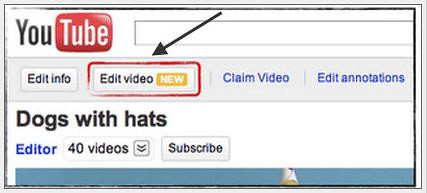
Click Edit Video on the video's page or on your My Videos page
Edit the video - You can stabilize hand-held footage, rotate a video, boost the contrast, and change the colors. There's even an "I'm feelin' lucky" option for one-touch color correction. YouTube has also added some filter-type effects (developed with Picnik).
Click Save.
Wait for the video to finish processing, and you're done.

Note: that you can still revert back to the original in the event you don't like the new edit. However, popular video clips with over 1,000 views can only be saved as new videos once edited (for more explanation on that, see their help page).
The new editing capabilities are being rolled out to all users today, though I'm not seeing them in my account currently. It doesn't appear as though you can make cuts or swap scenes around using this editing system--that kind of thing is something you'll still want to use your regular editing software for. But for correcting minor issues and improving the look of your video, this is an outright gift to video creators.
Click Edit Video on the video's page or on your My Videos page
Edit the video - You can stabilize hand-held footage, rotate a video, boost the contrast, and change the colors. There's even an "I'm feelin' lucky" option for one-touch color correction. YouTube has also added some filter-type effects (developed with Picnik).
Click Save.
Wait for the video to finish processing, and you're done.
Note: that you can still revert back to the original in the event you don't like the new edit. However, popular video clips with over 1,000 views can only be saved as new videos once edited (for more explanation on that, see their help page).
The new editing capabilities are being rolled out to all users today, though I'm not seeing them in my account currently. It doesn't appear as though you can make cuts or swap scenes around using this editing system--that kind of thing is something you'll still want to use your regular editing software for. But for correcting minor issues and improving the look of your video, this is an outright gift to video creators.


